How QR code key tracking works
Guide · Screenshots · Published September 16, 2026 · Updated September 24, 2026 · Example data is fictional
In QR key tracking, the QR code on a key tag is a quick way to open that set's record on a phone. It doesn't move, report or detect anything. People record each movement, and the code makes finding the right record fast.
Tag, record, logged movement
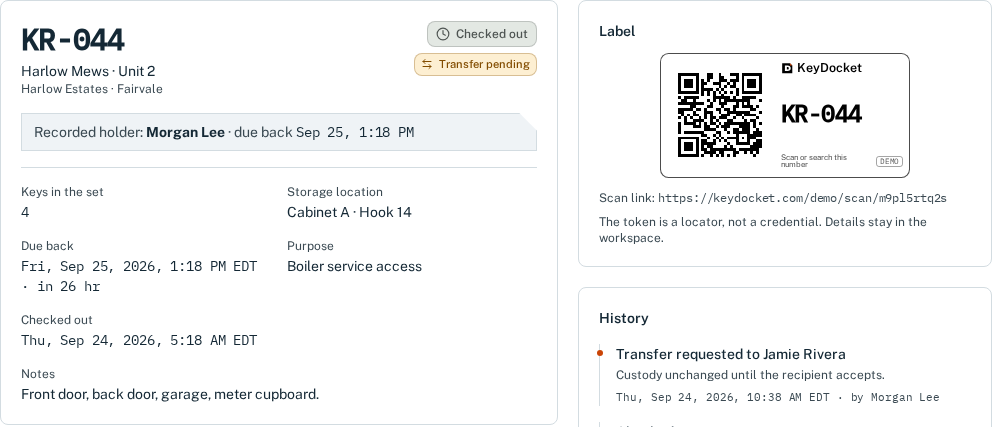
- The tag carries the set's short number (KR-044) and a QR code containing a random lookup link. The link has no address, holder or other details in it.
- The key record belongs to your workspace. It shows the property reference, keys on the ring, storage location, recorded holder and due-back time.
- A logged movement is an entry someone adds: check-out, handover request, acceptance or return. Each one is saved permanently in the set's history with who recorded it and when.
What happens when someone scans
Scanning opens the lookup link. In a live workspace, the person must be signed in as a member of the workspace that owns the set. Otherwise they see nothing about it. Members then choose what to record. Scanning alone never checks a set in or out.
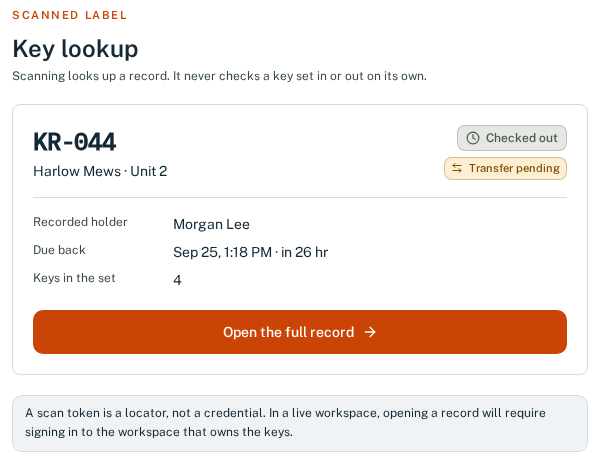
Open the demo scan for KR-044 and follow it through to the record.
Explore a labelled key record →What QR codes don't do
- No GPS or location. A printed code has no electronics and sends nothing.
- No automatic detection. Keys can move without anyone scanning. The record is only as accurate as your routine.
- No proof of possession. The record shows who is recorded as holder: a strong lead, not proof.
Practical label tips
- Print at 100% scale. “Fit to page” can shrink the code until it won't scan.
- Label the sets that move most often first.
- Keep the short number readable too, so people can type it in when a phone isn't handy.
For the full product workflow, see how KeyDocket works.
KeyDocket is a shared key register for property teams. 14-day free trial, no card needed.
Start free trial